Table of Contents
- What Is the Mirana Club Invite Code?
- How to Use an Invite Code When You Register
- Can You Add an Invite Code After Signing Up?
- How to Find and Share Your Own Invite Code
- Mirana Club Referral Rewards Explained
- How the 5-Level Commission Works (Basics)
- Common Invite Code Mistakes to Avoid
- Tips to Share Your Code the Right Way
The Mirana Club invite code is a short referral code that links a new account to the player who invited them. You type it into the optional field when you register, and once your own account is ready you receive a personal code to share with others. This guide covers both sides: using an invite code at signup, and finding, sharing and earning from your own code.
Please note that miranaclubgame.com is an independent guide and is not run by the Mirana Club platform. Reward amounts below were checked at the time of writing (October 2026) and can change, so always confirm the current terms on the Activity and Promotion pages inside the app.
What Is the Mirana Club Invite Code?
Every registered Mirana Club account gets its own referral link and invite code. When a new player signs up with that code, the platform records the inviter as their referrer. This is how the Invite & Earn program knows who brought whom, and it is the basis for invite bonuses and team commission.
The field is marked optional, so you can register without a code. However, if a friend invited you, adding their code is the fair way to credit them, and some invite-related rewards only work when accounts are linked through a referral.
How to Use an Invite Code When You Register
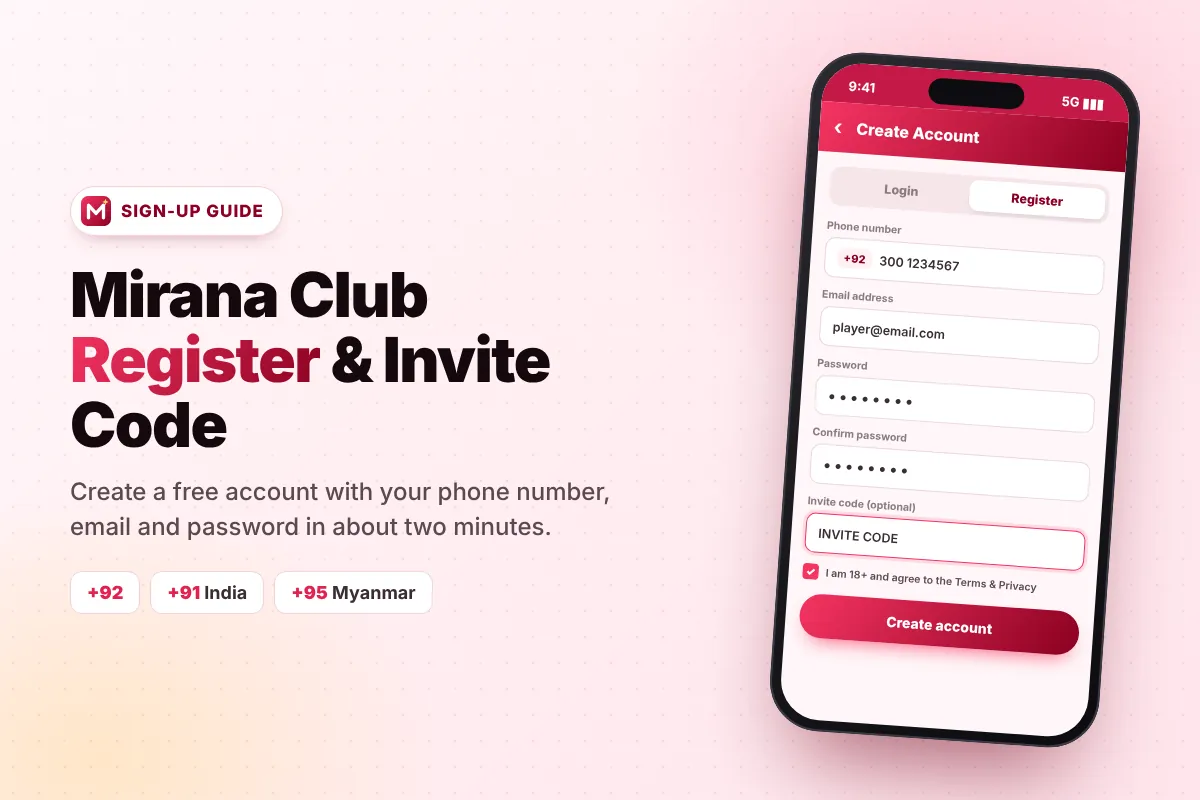
The code is added during signup, so keep it ready before you start. The whole process takes about a minute:
- Open Mirana Club Visit the platform in your phone browser or open the app you installed with our Mirana Club APK download guide.
- Tap Register The Register button is at the top of every page.
- Enter your details Add your phone number with the correct country code (for example +92 for Pakistan), your email address, a password and the same password again.
- Add the invite code Type or paste the code into the "Invite code (optional)" box. Check every character, because a wrong code will not link your account.
- Confirm and create Tick the box confirming you are 18+ and agree to the Terms and Privacy, then tap Create account.
For a full walkthrough with fixes for common signup errors, read the Mirana Club register guide.
Can You Add an Invite Code After Signing Up?
In referral systems like this one, the link between inviter and new player is created at registration. It normally cannot be added or edited later. If you forgot to enter a code, you can ask Customer Service inside the app, but do not expect it to be changed. The simple rule is: paste the code before you tap Create account.
How to Find and Share Your Own Invite Code
After you log in, open the Promotion page from the bottom menu. This is your referral dashboard, and it includes:
- Your referral link — a full link with your code built in, plus a Copy button.
- Your invite code — the short code friends can type by hand.
- A QR code — a friend scans it with their phone camera to open signup with your code already attached.
- Share buttons — one-tap sharing to WhatsApp and Telegram.
The referral link is usually the easiest choice because the code is added automatically. The QR code works well when you are sitting next to a friend, and the plain code is handy when someone already has the registration form open.
Mirana Club Referral Rewards Explained
The referral program has several layers. At the time of writing, these were the main ones (Pakistan figures):
Invite Bonus
Earn Rs100+ for each invited friend who joins and plays.
Invite Wheel
Spins on the Invite Wheel can pay up to Rs100 per spin.
Team Commission
A daily commission based on your team's play, shown as yesterday's and total commission.
Partner Rewards
Bigger tiered cash bonuses as you invite and grow more active players.
The Promotion page also shows a "My Earnings" panel. These figures help you see what your referrals are actually producing:
| Figure | What it means |
|---|---|
| Yesterday's commission | What you earned from your team the day before |
| Total commission earned | All commission since you started inviting |
| Reward bonus earned | Invite bonuses and partner rewards collected |
| Direct invites (L1) | Friends who registered with your own code |
| Team number (deposited) | Team members who have made a deposit |
| Team betting / deposit (yesterday) | Your team's total play and deposits on the previous day |
How the 5-Level Commission Works (Basics)
Mirana Club describes its Promotion Partner program as a 5-level agency commission. In simple words:
- Level 1 is made up of players who joined directly with your code.
- Level 2 is made up of players invited by your Level 1 friends, and the chain continues down to Level 5.
- You earn a share of your team's activity each day, and the rate is usually smaller at deeper levels.
Exact rates are listed in the Partner Rewards section and may change at any time. Read them before you promote your code. Remember that commission depends on real player activity — it is not a salary and it is never guaranteed.
Common Invite Code Mistakes to Avoid
- Typing errors — letters such as O and 0, or I and l, are easy to mix up. Copy and paste whenever possible.
- Adding the code too late — once the account exists, the referral usually cannot be added.
- Making extra accounts — signing up again with your own code to collect bonuses breaks the rules and can lead to blocked accounts and lost balances.
- Spamming groups — posting your link everywhere can get you reported. Share with people who are genuinely interested and over 18.
- Promising profits — never tell friends they will surely earn money. Every game carries risk.
- Ignoring turnover — invite rewards may carry a wagering (turnover) requirement before they can be withdrawn. Our Mirana Club bonus guide explains how turnover works.
Tips to Share Your Code the Right Way
Explain to friends what the platform is, show them demo mode first, and suggest they start with a small deposit. Send them an honest overview such as is Mirana Club real or fake so they can decide for themselves. Friends who trust you tend to stay active longer, and steady activity is what referral rewards depend on.
If a friend has trouble adding money after joining, our deposit and withdrawal guide covers the payment methods players use in Pakistan, India and Myanmar.
Joining Mirana Club with an invite code?
Enter coming soon in the optional invite code box on the signup form.
Frequently Asked Questions
Is the Mirana Club invite code required?
No. The invite code field is optional, so you can create an account without it. If a friend invited you, adding their code credits them for the referral.
Where can I find my own Mirana Club invite code?
Log in and open the Promotion page. You will see your referral link with a Copy button, your invite code, a QR code and share buttons for WhatsApp and Telegram.
Can I add or change the invite code after registering?
Usually not. The referral link is created when the account is made. You can ask Customer Service, but the safe approach is to enter the code before tapping Create account.
How much can I earn by inviting friends?
At the time of writing, the platform listed Rs100+ for each friend who joins and plays, Invite Wheel spins worth up to Rs100, and daily team commission. Amounts change, and earnings depend on real activity, so nothing is guaranteed.
Can I use my own invite code on a second account?
No. Creating extra accounts to claim referral rewards breaks the platform rules and can lead to the accounts being blocked.